YTMP3 turns one link into one MP3, and for a single song that is all you need. A music collection is another job: you look songs up by name, keep them in order, and play them where there is no signal. The y2mate app for Android puts those steps in one place. This guide covers how it saves music, what its file format means for you, and how it lines up with SongTube, Seal and YTDLnis.
How does the Y2Mate app save music?
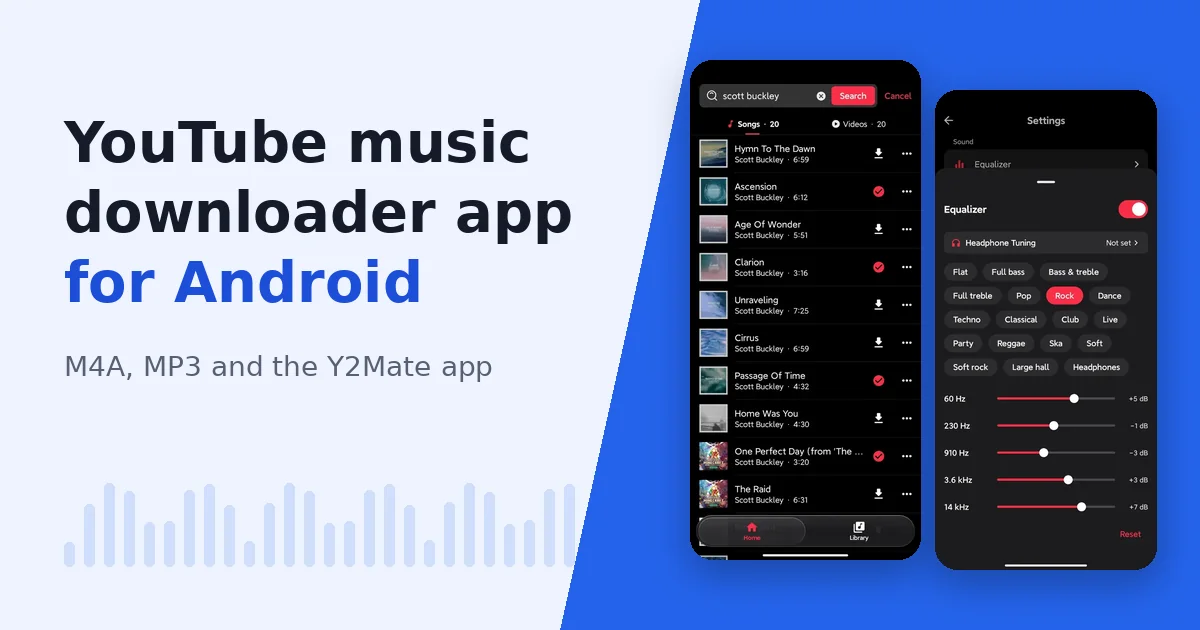
You type a song name or paste a YouTube link, tap the arrow beside the result, and the track is stored on your phone. The Y2Mate app page lists these music features, as of 24 November 2026:
- Songs on their own tab. Search results split songs from videos, so each has its own list.
- One library. Downloads, playlists and the music already on the phone are in one place.
- Lyrics in time. When a song has timed lyrics, they follow the playback.
- Sound tuning. There are equalizer presets, bass boost, surround, and settings for your headphone model.
- Screen off. Music continues in the background, with controls in the notification.
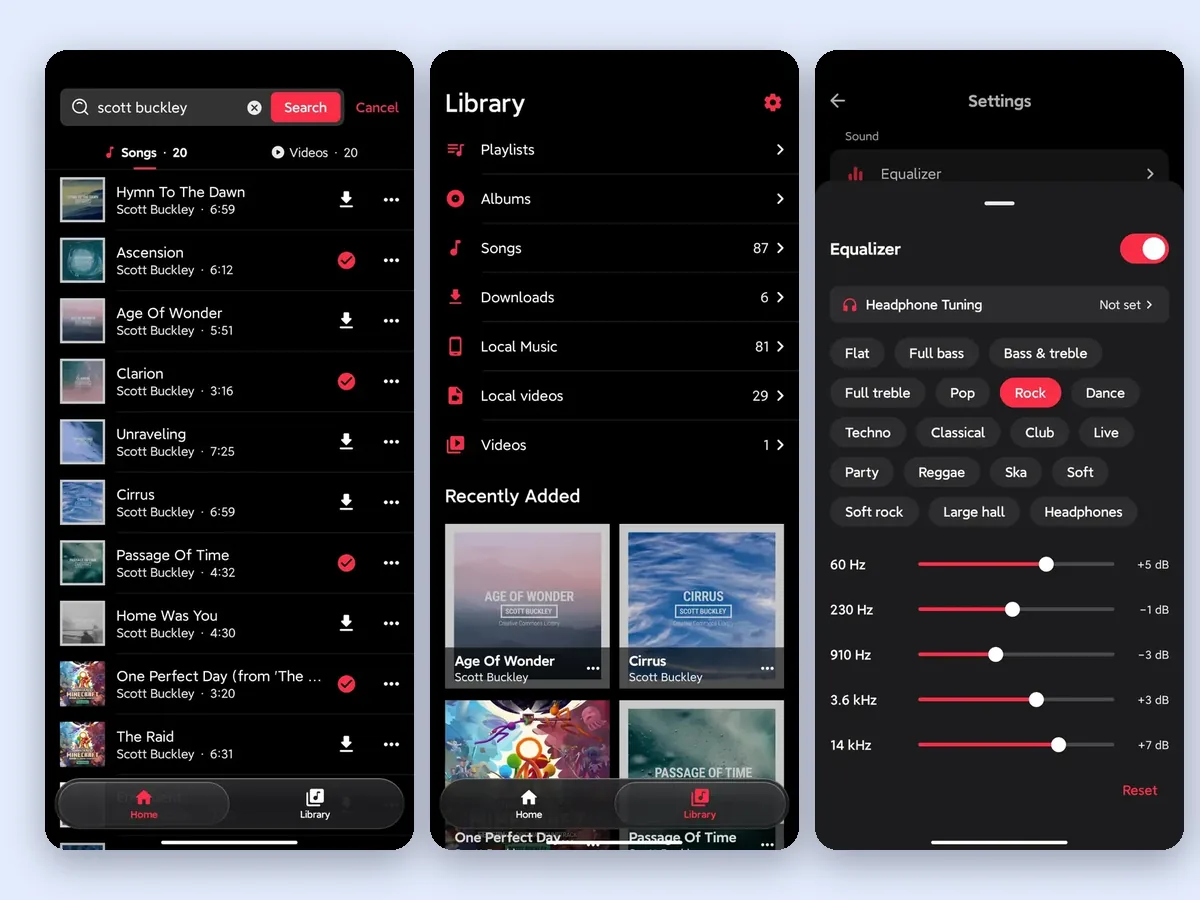
The player also opens files that did not come from the app. Its page names MP3, M4A, FLAC, OGG, OPUS and WAV, so music you copied from a computer works too. You can also pull the sound out of a video on the phone and keep it as M4A; the page says nothing is uploaded.
M4A or MP3: does the format matter?
On a phone, hardly ever. The Y2Mate app saves songs as .m4a, the usual container for AAC audio, and Android's format list includes both AAC in .m4a and MP3. The format starts to matter when the file leaves the phone.
Quality has a ceiling. YouTube Music's audio settings go from 128 kbps for Normal up to 256 kbps, in AAC and Opus, and picking the bitrate takes a Premium membership. Converting that sound to 320 kbps MP3 cannot put back what was never there. It only makes the file larger.
Pick MP3 when the device asks for it: an older car stereo, a cheap music player, or software that refuses .m4a. In that case paste the link into YTMP3, press MP3, and you get a file at 192 to 320 kbps. The Y2Mate player opens that file as well, so the two work together.
Y2Mate next to SongTube, Seal and YTDLnis
All four are free Android apps installed from outside Google Play. Y2Mate and SongTube come with a music player. Seal and YTDLnis are downloaders first, and hand the file to whatever player you use. "Not listed" means the app's page or README does not mention the feature, which does not prove it is missing.
| Feature | Y2Mate | SongTube | Seal | YTDLnis |
|---|---|---|---|---|
| Version | 1.0.3 | 7.4.0 | 1.13.1 | 1.9.1.1 |
| Released | November 2026 | 1 August 2026 | 16 October 2024 | 19 October 2026 |
| APK, 64-bit ARM | 34.8 MB | 50.4 MB | 43.1 MB | 70.0 MB |
| Android needed | 8.0 | 5.1 | 5.0 | 7.0 |
| Music player | Yes | Yes | Not listed | Not listed |
| Equalizer | Yes | Yes | Not listed | Not listed |
| Lyrics | Timed, in the player | Not listed | Not listed | Saved or embedded |
| Audio formats named | M4A | AAC, OGG, MP3 | None named | None named |
| Song tags | Not listed | Tag and artwork editor | Embeds metadata and thumbnail | Edits title and author, embeds metadata |
| Whole playlist download | Not listed | Not listed | Yes | Yes |
| Source code | Not listed | GPL-3.0 | GPL-3.0 | GPL-3.0 |
Sources, read on 24 November 2026: the Y2Mate app page and APK file, and the READMEs, build files and GitHub releases of SongTube, Seal and YTDLnis. Seal's Android version is the one on F-Droid.
Read the table by what you do most. If you care about song tags, the other three apps name more features for them. If you save whole playlists, Seal and YTDLnis name that feature. If you mainly search, save and listen on one phone, Y2Mate's list matches that use, and it names lyrics inside the player.
Check the release dates too. YouTube changes often, and a downloader that is not updated can stop working. Seal's last stable release is more than two years old. Y2Mate says the part that talks to YouTube can update itself without a new APK, and YTDLnis lists automatic yt-dlp updates.
Install the Y2Mate app in five steps
- Open y2-mate.app in the browser of your Android phone and choose Get app.
- Tap Download APK. The file is about 35 MB.
- Open it from the notification or the Downloads folder, and let the browser install unknown apps if Android asks.
- Tap Install and then Open. Search for a song to check that it works.
- Go back to the Android settings and take the unknown-apps permission away from the browser.
Songs are stored in Music/Offmusik. Offmusik is the app's earlier name.
What it does not do
- No MP3 output. It plays MP3 files but saves songs as M4A.
- No iPhone, Windows or Mac version. On those, a converter page is the way.
- No 32-bit phones. The APK is for arm64-v8a only.
- No source code listed. The other three apps in the table are open source.
- Not on Google Play. Several apps share the Y2Mate name, and the page says they belong to other developers. This one's package name is com.offmusik.app.
Is it safe, and what does it ask for?
Every APK carries more risk than a store app, and this one is no exception. Get it only from its own site, and stop if Google Play Protect shows a warning.
According to its page, the app uses the network, notifications, your music and video files, background playback, and a restart permission to finish downloads. It does not ask for contacts, messages, location, camera or microphone. You can check that yourself: long-press the icon, open the app info and tap Permissions. Its privacy page says the app has no account and sends the Android ID, phone details, usage events and crash reports, without song titles or search words.
Android is changing its rules for apps like these. Google's developer verification started on 30 September 2026 with participating stores in Brazil, Indonesia, Singapore and Thailand. Its FAQ says sideloaded apps are not part of that first date, and that a wider check follows in 2027.
Are you allowed to save the music?
That depends on the song. YouTube's terms don't allow downloads unless the service or the rights holders permit them. Your own recordings, music under an open licence, and tracks whose owner has agreed are the safe cases. Rights holders can reach this site through the copyright page.
For chart music, the paid route is the simple one. YouTube Premium costs $15.99 a month in the US since April 2026, 9to5Google reported. The cheaper Lite plan has downloads, but not for music. Downloads stay inside YouTube's apps and need a connection at least every 48 hours.
Questions
Is the Y2Mate app free?
Yes. Its page says it is free, with no ads, no paid plan and no account.
Can it save songs as MP3?
No, songs are saved as M4A. For an .mp3, paste the link into YTMP3 and press MP3.
Does it play music without internet?
Yes. Songs you have saved, and the audio files already on your phone, play offline.
Will M4A files play in my car?
Often, but not always. Car makers list the formats in the manual. If only MP3 is listed, convert the song to MP3 first.
Compiled on 24 November 2026 from published app pages, GitHub releases and the Y2Mate APK file. The apps were not run or speed-tested for it.